


Why Onsite Search Bar is An Important Part of Your Website?
February 24, 2015 | Sudeep Banerjee
Online e-commerce stores should always give their attention to each and every detail of their website. But while online merchants are believed to focus more on elements like the product page, color, page template, copy , etc, to generate better conversion, some of them hardly seem to pay any attention to their site’s search feature.
Did you know? Approximately 30% of visitors online, prefer using the search site box for searching any product. It is these users who perhaps show some intention to make a purchase of a possible product.
So, Why Does The Search Bar Need More Attention?
You will get the answer to this question only when you question yourself why customers use the ‘site search’ bar.
Quicker Search-ability
Using this feature, customers can just insert their query and simply click on the search button to narrow down their result. It is quicker and easier to find a product, especially if your site has too many products to offer. Quicker search-ability means, you are reducing the extra effort that your customer might have had to implement, had there been no such option.
How Do Store Owners Benefit From The Feature?
Improvement In Conversion: Making things simpler and easier influences a person’s purchasing desire. Your customer is happy to visit your site. Happy customers mean happy conversions for you.
Improvement In Customer Loyalty: Customer loyalty means, when visitors are able to find what they are searching for faster, then they are bound to come back again to your site in future.
Improvement In Visits And Registrations: When satisfied customers turn loyal, they are going to come back to your site more than once or twice. This will help to improve your search engine rank and get new leads.
Improvement In Brand Position: An increase in the number of site visits mean brand improvement. People are visiting your site because they are satisfied with the service you provide. This helps to uplift your brand image among other competitors.
Points To Remember When Making Improvements To The Search Function Of Your Site.
#1- Location Of The Search Box
The search box should be clearly visible to a shopper , no matter on which page they are. The standard position, where the search box can be located is generally on the top right corner of your website. You can follow this, since creating some familiarity can speed up a customer’s search, leaving him lesser time to think about. Many e-commerce sites place their search bar on the top, just above or near the navigation menu bar. Take a look at Best Buy‘s search box position for example –

#2 – Color Of The Search Box
The search box color must be able to draw attention towards it. That is why, the color must be set in contrast to the main website color. Look at how Next uses color options when using it for their search bar:

#3 – Search Box Texts And Labels
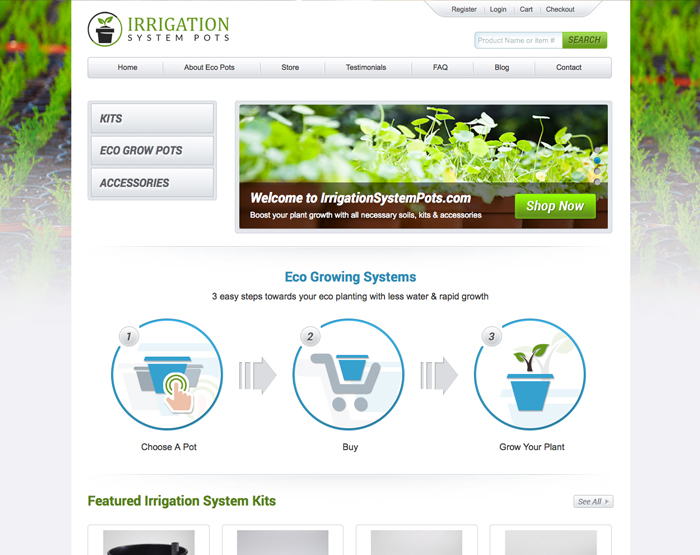
Make the purpose of your search box clearly visible. Call-to-action texts like ‘Search Best Buy’ or ‘I am searching for’ tell the customer what to enter. Customers like it when you give them a proper guidance. Add a ‘search’ or ‘go’ button beside the bar coupled with a stylized icon like an arrow or a magnifying glass. Here is an example below:
#4 – JavaScript To Make The Text Disappear
Using JavaScript will help the label or the text inside the search box to disappear when a user clicks on the box. Customers may find it increasingly annoying if they have to delete the entire text themselves, whenever they click to type. It is your job not their’s.
#5 – Size Of The Search Box
You can consider testing the size of your search box. For this, you need to check your customer behavior. If you find that your visitors are using lengthy words to search for results, then you can make the size of your search box a little larger. This will help customers to see what they are typing down in the inquiry box. Amazon has a lengthy search box that enables users to insert details like the model number, name and code number of a particular product.

#6- Auto-complete Search
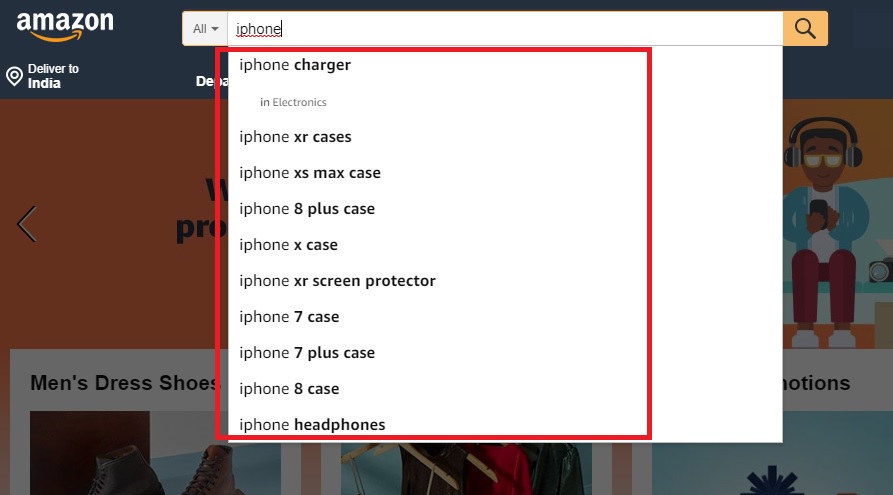
What are the advantages of using auto-complete search? It speeds up a consumer’s search process, avoids any kind of spelling error and is sure to bring a return result for the customer. Every time someone starts to insert one or two words, a list of suggestions appear. Many users simply click on the suggestions provided below, instead of going through the effort of typing down the entire sentence.
Now That You Know…
How site search is an important feature that cannot be left neglected. Check your site data to find how many customers are actually converting after they used the search site function. Customer behavior is an important data that you need to keep a track of, since a careful study will help you to realize how much are you actually converting every month.

RELATED POST

Table of Contents Google – The Reach King For AwarenessLinkedIn – The Precision PowerhouseGoogle Ads Vs LinkedIn Ads: What is...
READ MORE
In the short span of 10 years after its launch in May 2003, WordPress has become a titan of...
READ MORE
Creating a memorable logo is undoubtedly a tricky job. Even successful companies like Microsoft, Pepsi, Starbucks and Yahoo have gone...
READ MOREPartners



Copyright © 1999-2026, B3net inc.