


7+ Reasons Why Your Website Is Not Showing Up on Google (And How To Fix It)
July 13, 2023 | Sudeep Banerjee
We know that in this vast and fast-paced digital landscape, you probably understand how important it is to have a website for your business. And so, with determination in your heart and dreams in your eyes, you have put in every effort to build your website.
Here’s a scenario: you have had your website all ramped up and revved to take on the digital world by storm. You try to search on Google, and lo behold; you are devastated by what you see in front of your eyes. Because, from the names of your local competitors to the industry leaders, you see everything under the sun but not the website you so lovingly built for the past few daunting weeks. You start pondering what went wrong that your site is not showing up on Google.
You think it will probably appear in the second or subsequent pages. You continue searching for your website to pop up, but it does not show up.
You try every trick to search your website and see the same results. You start wondering, “Why my website is not showing up on Google?“.
If you have been mulling over why Google does not show your site and are still on the hunt to find something useful to tackle that grave problem you have been facing, you have come to the right place.
Because, whatever the causes could be, they very well can be tackled with patience, determination, and, most importantly, knowledge. So, read on to learn why your site is not showing up on Google and the possible solutions to fix them.
So, let’s get started.
Crucial Reasons Your Website Is Not Showing In Google Search (And, What To Do To Fix Them?)
There could be countless reasons why Google doesn’t show your website. But, the technical experts have come down to a few crucial ones that get repeated in most scenarios.
From being an absolute newbie or erroneously blocking Google crawlers to index your site’s pages to your keywords being a tad bit too competitive or your site’s content does not match the user’s search intent – the reasons could be as varied as the stars in the sky. It’s also possible that your website has incurred the wrath of Google’s penalties, sentencing it to a prolonged exile from search results.
Reason 1: Your Website is An Absolute Newbie

Google says it takes up to a few days to a few weeks to discover your website or page, and it does so on its own.
But what if it doesn’t find your website within that time? How do you know if Google has found your website or not? You may use a simple operator search here. Use the syntax: “site: nameofyourwebsite.com”
Let’s see if Google has discovered the website of a well-known sports brand.
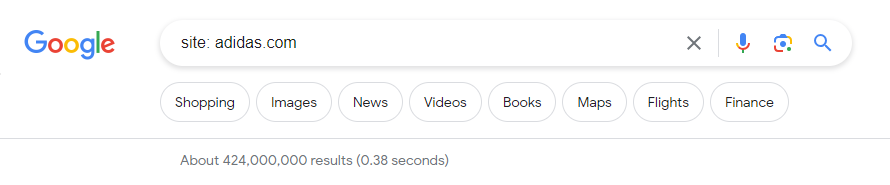
If Google returns even a single result for your site syntax operator search, bingo, it has found you!
But what if it doesn’t? Well, send it a request to find you.
How to fix it?
Submit a request to Google to find your website. How? By creating a sitemap and submitting on the Google search console.
When you submit a sitemap, you are snapping your fingers for Google’s attention and inviting it to come and see how great a site you have.
Follow these steps to create and submit a sitemap:
- Login to Google Search Console
- Navigate to Sitemaps
- Enter sitemap URL
- Click submit

Reason 2: You’re Blocking Search Engines From Crawling Your Web Pages
If Google’s crawlers do not crawl your website, it doesn’t know your site exists. Googlebots, also known as crawlers, spiders, or simply bots, are programs meant to visit various websites and report back to Google what they found during their visits.

Now, there are a few reasons these bots aren’t able to crawl through your web pages. Maybe you are blocking them – intentionally or unintentionally.
- Technical misconfiguration – Fixing the robots.txt
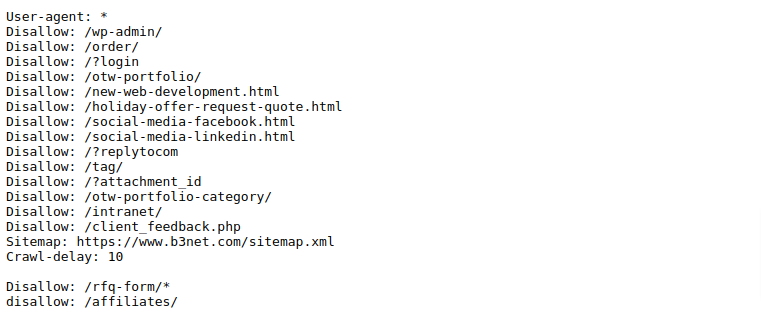
Within your website, Google asks you to set up a route map or directive to follow for the Googlebots. These are known as robots.txt, and they guide the search engine crawlers while navigating your site’s pages. If your robots.txt file contains instructions restricting the bots to crawl and index a few of your web pages, Google will not know about those pages.
It’s an error known as a crawl error. There could be various reasons for this – such as erroneously ticking particular options that lead to putting up a command or instruction for Google not to visit certain pages.
Secondly, most developers keep the “noindex” tag activated during the development phase and might forget to remove it at the time of going live.
Whatever the causes of the issues, let’s see the possible solutions to fix them.
How to fix it?
To fix this, review your robots.txt file. Ensure that your site’s robot.txt file has clear instructions that allow access to the relevant sections of your website to let Googlebots crawl through your site’s pages smoothly.
- Crawl errors – Broken links, duplicate content, etc.
If your website contains broken links, it will not let Googlebots explore it properly. Also, if your website has duplicate content, it will confuse Googlebots. In both cases, it will lead to a crawl error.
How to fix it?
Regularly monitor Google Search Console for any crawl errors and fix them promptly to facilitate proper indexing.
- Look for broken links within your website and fix them as soon as you find them.
- First, try to make your content as unique as possible. And, if you have to include some duplicate parts of your content, ensure that you use canonical tags to let Google know which version of the content you would want to be preferred as original.
- Additionally, interlink the important pages of the site to facilitate effective and smooth navigation for the crawlers to discover your website in its entirety.
Reason 3: Google Penalized Your Website
Google penalties are a dreadful thing. It eventually leads to delisting a site from the search results, which means the site’s rankings for its target keywords drop dramatically. As a result, if Google penalizes your website, your target audience won’t be able to find you. And it may penalize any website that violates its guidelines.

Now, to keep and maintain the high quality and integrity of the search results, Google has laid down specific guidelines known as Google Search Essentials. It states the do’s and don’ts a website should follow to feature high in the search results.
In short, Google is against manipulative and spammy practices. And if your website is caught on the radar, whether it’s the culprit or not, Google will penalize it.
There are two types of penalties – algorithmic and manual. Whatever the type of penalty, the following are the common reasons a website gets penalized by Google:
- keyword stuffing or irrelevant keywords
- hidden text or links,
- cloaking (displaying different content to search engines and users),
- low-quality or duplicate content,
- unnatural or spammy backlinks attracting spyware, adware, and viruses
It is worth noting here that penalties can also occur due to unintentional mistakes or through the actions of a malicious competitor.
How to fix it?
Fixing it has two operations. Finding what went wrong and then making the appropriate corrections to bring it back on track. Follow the below steps to get out of the penalty zone.
- Conduct a thorough audit and analysis of your website and review its –
- Content,
- Backlinks,
- Technical elements
- Remove or rewrite any content that violates Google’s guidelines
- Remove toxic and malicious backlinks
- Address the technical issues that may have led to your website’s penalty.
Once the necessary changes are made, submit a reconsideration request to Google for a chance to regain your website’s visibility.
Recovering from a penalty can take time. So have patience and continue adhering to Google’s guidelines. It is essential to maintain high-quality, valuable content, engage in ethical SEO practices, and monitor your website regularly so that you do not have to ever again worry about why your website is not showing up on Google.
Reason 4: Your Website Is Too Slow

People do not want to wait for long for a website to load. And thus, looking at the trend, Google wants to show their users those websites which load faster than others, thereby prioritizing page loading speed while ranking a website.
There could be several reasons that slow down your website’s loading speed.
- Large images,
- Unoptimized coding,
- Excessive plugins,
- Lack of browser caching, etc.
How to fix it?
Optimize your website’s performance by
- Compressing images – without compromising quality
- Minifying code – by reducing unnecessary comments, formatting, etc., on code files like JavaScript and CSS
- Leveraging browser caching- by setting proper cache headers, etc.
Regularly conduct speed tests and address any bottlenecks to ensure your website loads quickly, providing a seamless user experience. This will improve your website’s visibility and ranking.
Reason 5: Your Website Lacks Quality Backlinks and Hence, Credibility and Authority
One of the factors that influence a website’s visibility on Google is its presence and reputation elsewhere on the web. If your website has adequate mentions, links, or references from other reputable websites, it may gain considerable visibility in search results pretty soon.

It is because external links and backlinks serve as a vote of confidence and authority, indicating to search engines that your website is reliable and valuable.
How to fix it?
The Dallas digital marketing agency recommends the following steps to attract trustworthy backlinks and, thus, earn confidence and credibility for your website.
- Focussing on the target audience, create unique, valuable, and high-quality content for them & market it through various channels and spaces.
- Reach out to your industry’s peers, influencers, and leaders to guest blog and showcase your expertise to their audiences. It’s also known as “collabs” colloquially (short for collaborations).
- Network and engage with audiences on online social platforms, etc.
Reason 6: Your Website Doesn’t Look Trustworthy To Google
Would you visit a website that looks shady? Not only by design, but the fact that you are browsing through that website renders you vulnerable to unscrupulous elements such as virus attacks or causing harm to your financial and personal information.
The same would be the case with your website. If Google thinks that your website is not trustworthy enough, it will push your website further down in the search results ranking.
How to fix it?
Google’s emphasis on website security is evident in its ranking algorithm, with HTTPS encryption being a significant ranking factor. Thus, you may do the following to ensure Google finds your website trustworthy.
- Use an SSL certificate on your website to display it is secured.
- Be transparent about your policies, especially privacy policies and personal data collection and sharing policies.
- Include a “Terms and Conditions” section on your website.
- Give the visitors a link to your Social platforms.
- Collect and display user testimonials, also known as social proofs, that show how happy your customers are with your products and services.
Reason 7: Your Website Has Poor UX, and it’s not optimized for Phones
Whether because of the website’s design, content, layout, or technical glitches and unresponsiveness, poor user experience (UX) will eventually irk the users. Google takes notice of the fact that your users are fleeing away from your website sooner than later. Moving forward, Google will refrain from recommending your site to other users.

Our designers at the web design company in Dallas noticed that the changing dynamics of user’s preferences toward mobile devices had prompted Google to take two vital actions:
- Googlebot Smartphone crawler, which specifically targets and crawls the mobile version of the website, reports a website as non-existent when it lacks a mobile version. And, here you keep on wondering why your website does not show up in Google.
- Mobile-first indexing – Google prioritizes the mobile version of any website for indexing and ranking, indicating the crucial role it plays in a website’s survival and success.
How to fix it?
Taking a cue from this, web designers have adopted a mobile-first design approach, in which how a user interacts with your website on a mobile device is given the first consideration before moving on to other devices.
- Ensure your website has a mobile version and is compatible with various mobile screens giving a consistent and seamless experience across devices.
- Ensure the design is optimized for mobile responsiveness eliminating the need for users to zoom in or scroll horizontally.
- Simplify navigation with easy readability on smaller screens.
- Implement touch-friendly design elements and ensure buttons, links, icons, and interactive elements have enough space around them to prevent accidental clicks, making them easily tappable with fingers.
It not only enhances the mobile experience for users but also Google’s smartphone agent recognizes these elements. Thus, when it reports back, your website will be geared to feature high on Google’s search results.
Reason 8: Your Keywords are Too Competitive

Keyword competition refers to the level of difficulty in ranking for specific keywords in search engine results. If the keywords you target are highly competitive, it can be challenging to achieve high rankings on Google. Understanding and addressing this issue is crucial for improving your website’s visibility and organic traffic.
There is fierce competition for popular keywords. However, people ignore the importance of targeting long-tail keywords with less competition.
How to fix it?
Targeting less competitive keywords allows you to tap into untapped opportunities, increase your chances of ranking, and attract organic traffic without breaking the bank on advertising.
Do the following:
- Conduct comprehensive keyword research to identify relevant keywords with lower competition.
- Look for long-tail keywords or niche-specific terms that are more specific and have a higher chance of ranking.
- Consider the intent behind the keywords you target. Align your content with the search intent of users.
By providing relevant and valuable content that matches user intent, you increase the chances of ranking higher for targeted keywords.
The Dallas SEO company suggests teaming up with a professional digital marketing agency to develop a long-term SEO strategy that focuses on building authority and credibility for your website.
Over time, as your website gains authority, you can target more competitive keywords with a higher chance of success.
Reason 9: Your Web Page Content Does Not Match “Search Intent”
Aligning your website’s content with the user’s search intent is essential for search engine optimization and visibility in search results. Search intent refers to the intention of the user behind searching. And a user may have various intentions, viz., seeking information, making a purchase, or trying to find a solution to a problem, etc.
If your website’s content does not match the user’s search intent, it will eventually hinder the ranking and relevance of your website.

How to fix it?
Understanding and aligning your content with user search intent increases the likelihood of attracting organic traffic.
- Study the search queries related to your industry or niche, identifying and analyzing their patterns to understand the intent behind them.
- Strategize and develop contents that precisely match your target audience’s search intent.
- Pay attention to your content’s meta tags and descriptions to ensure they reflect and effectively communicate the content’s relevance with the user’s search intent.
- Regularly monitor and optimize content to keep up with the ever-evolving search trends.
Delivering valuable content that matches the user intent consistently can increase organic traffic and establish your website as a valuable resource.
Master The Secrets To Optimizing Your Website For Online Success
There you go! We have explained in fair detail the reasons why your website is not showing up on Google. Now that you understand the secrets, you can work around those issues and regain your website’s visibility, traffic, and growth.
It may be worthwhile to understand that a lot of these issues may be highly technical, and thus working around them would require a fair bit of expertise and experience. As an entrepreneur, you would want to focus on your business and worry less about why your site is not showing up on Google.
Allow us to bring your attention to our professional digital marketing services. With years of experience and expertise in digital marketing, SEO, website development, and web design, B3NET Inc, a Dallas digital marketing agency, qualifies as a worthy companion for your business’s digital journey. Contact us to take your business to newer heights in the digital realm.


RELATED POST

Thinking of entering into the ecommerce business? Then this is the right time! According to experts’ forecasts, ecommerce sales can...
READ MORE
Table of Contents Adobe Brackets – CodePen – Opera Mobile Emulator – Code Anywhere – Cloud 9 IDE – Mark...
READ MORE
Last Sunday, I was sipping over my morning coffee enjoying the company of one of my close friends. Even though...
READ MOREPartners



Copyright © 1999-2026, B3net inc.