The most vital point of growing a business is to attract the right audiences. Being the owner, you should always try to find innovative ideas to promote your business. Hence, nothing can be as perfect as an image that explains the propositions of your brand.
Pinterest plays a significant role in showcasing your products and services. By creating a business account on Pinterest, you can get many opportunities for online presentations of your company. For promoting your business in such a way, Dallas digital marketing agency can help you.
Using Pinterest to Get More Advantages in Business
There are plenty of high-quality images known as Pins on Pinterest. When you are using Pinterest for your business purpose, linking the Pins to your official website is highly beneficial. Experts at digital marketing company in Dallas can help you post eye-catching Pins with practical captions that will boost the number of your followers.
When it comes to finding inspiration and ideas for their interest, people prefer visiting Pinterest. Therefore, to reach more people, it is an excellent platform. There are distinct advantages to using Pinterest for your business promotion.
Additional website traffic
Your traffic also depends on the quality of your content. Professionals at digital marketing agency in Dallas can help you create engaging content that will work as a traffic booster for your website.
Pinterest can identify what people are mostly looking for through the saved Pins on their boards. The digital marketing professionals at B3NET understand the importance of these metrics and deliver the content according to your target’s choice.
Pinterest uses several inbound links that drive traffic to your website. When the users like and prefer to see more from you, they save your posts and follow your links. It may drive a large account of traffics to your website.
Effective Pinterest ads
You can add advertisements for your brand around keywords, location, age, interest, and other categories. In fact, the cost of advertising on Pinterest is cheaper compared to any other social media platform.
As users are interested to discover and purchase new products, they do not get interrupted by the ads. Hence, advertising on Pinterest is more effective than on other social media platforms. There are different formats for ads and campaigns that you should acknowledge to reach your goal.
The pinners are ready to shop on board. You just need to present the advertisement of your brand in front of them. If you reach a Dallas digital marketing company, they can provide you with some fresh ideas for your brand advertisements.
Growth of brand awareness and sales
If you have started a new company or launched a new product, Pinterest is an effective tool to make your brand or product recognized by others. About 80% of people explore new things on Pinterest, and more than 55% of them purchase a product from a new brand after watching a video or image on Pinterest.
Studies show that Pinterest is more effective to convert its visitors into buyers. It increases the sale of a brand or company as it leads visitors straight to the websites of their preferred products. You can find a reliable digital marketing company in Dallas, and they will help you by creating attractive images and videos related to your business.
The Rich Pins sync the data, such as price, availability, and description automatically from your website. All this information appears on the shop tab of the search result, and thus it makes purchasing easier for users.
How to Set Up a Business Account on Pinterest
When you have considered all the benefits of having a business account on Pinterest, you must be searching for how to create a Pinterest account. If you are a beginner, you must go through the steps below:
Sign up for a new account
First, you have to visit the official website of Pinterest. There, you will find the ‘Sign Up’ option at the top right of your screen. Click on that and look at the bottom of the pop-up. Then, click on the ‘Create a business account’ tab.
Insert all the required data
After clicking on the ‘Create a business account’ tab, you will need to fill in your personal information, such as email address, password, and age. Make sure to put an email address that does not have a Pinterest account before. Then, click on the ‘Create Account’ tab.
Put information to build your business profile
After creating the account, add your business name, language, and location. Then, click Next, and you will be asked to describe your business. Select an option that fits your business and link your official website afterward.
Now, you have successfully created a business account on Pinterest. Select if you wish to run ads, and click Next. When you are too busy to run your Pinterest campaigns, rely upon a Dallas digital marketing agency.
Convert Your Personal Account to a Business Account
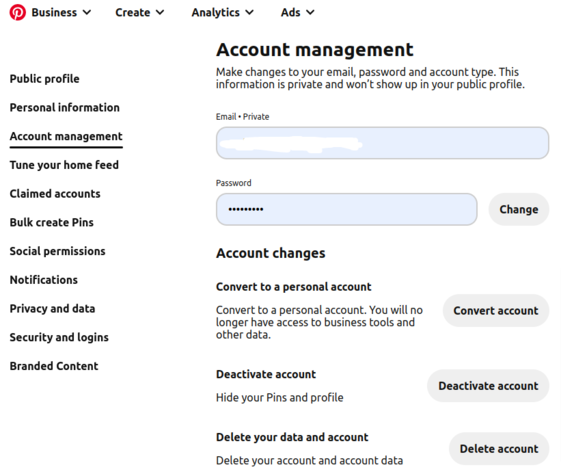
Do you run a personal Pinterest account with your official email for business purposes? If yes, you have missed the chance to create a new business account with the same email ID. But, do not worry. You can easily convert your personal account into a business one by following the steps below:
- Log in to your personal account and
- Go to the Setting option
- Click on the ‘Account Management’ tab at the left of the screen
- There you will find ‘Account changes’, and click on ‘Convert to a business account’ after.
- Next, click on ‘Convert account’
- Then, fill out the necessary data to build your business account.
The positive factors about switching accounts are
- It is free of cost
- Your posts and pins remain the same
- You can switch to your personal account at any time.
Connections with Other Social Media Platforms
One of the most significant ways to grow your business through Pinterest is to link your Pinterest business account with other social media applications. Linking your Pinterest business account to any other social media application is not a tough job. You should hire an authentic digital marketing agency in Dallas, and follow the steps below.
- Go to the Setting option on your Pinterest business account
- Hit the “Social Network” tab and click on the network you want to connect
- Enter the required information there.
What are Rich Pins on Pinterest?
When you want to put some extra details to Pins from your website, use Rich Pins. You can find four categories for Rich Pins.
- Article Pins: Article pins highlight all the valuable information of an article, such as the headline, story description, and writer’s name.
- Recipe Pins: You can add a title, ratings, serving size, cooking duration, and ingredients to a Recipe Rich Pins.
- Product Pins: Product Rich Pins show the title, availability, up-to-date price, and description of a product. If your Pin becomes one of the most purchased items within a Pinterest product category, it can achieve a ‘best seller’ badge. If your Pin is the most clicked product Pin, it may achieve a ‘popular’ badge.
- App Pins: App Rich Pins allow you to add an install button to your Pins. If you have an app for your business, it takes the users quickly to the download page without leaving Pinterest.
It is equally essential to find what your audience is interested in. If you hire a Dallas digital marketing agency, it can assist you to reach new leads for your business. As digital marketing professionals have expertise in this field, they can help you connect with the right person and lead your business to the top.